Of course, there are larger concerns at stake in regards to COVID-19, but as an online business, brand or organisation, you have a responsibility to keep your audience informed on what measures you’re taking. No matter your line of work, it is essential your webpage articulates the adjustments you are making as a result of the pandemic.
There are a plethora of ways in which you can keep your online audience informed on what your response is to COVID-19. Alert bars, headers, landing pages and regular updates are just a few examples of ways in which to keep your clients and online customers updated.
5 ways to update your website
1. Create a homepage masthead
Your homepage represents your brand as a whole and often features the most important information on your site. By pushing information on how COVID-19 has impacted your business on your homepage, you’re conveying to visitors that you’re taking matters seriously. Updating your homepage is also a great way to boost your ‘freshness’ which is a valuable signal for Google when considering how high you rank.Things to consider: Using a high-quality image will elevate your text and gain further interest which is the ultimate goal. As well, keeping the copy short will help reduce text wrapping on narrow sized browsers. Finally, use language and jargon which will elicit a response from visitors like “keep updated” or “explore the latest” with a link to your COVID-19 page.
2. Create a landing page for all COVID-19 related news
Choose a single page where you will detail all your latest information in regards to COVID-19. When doing this, do not change your URL. In keeping your URL, you will avoid having to change your alert bar each time you update it. Visitors can also bookmark that page. This is also good for SEO as search engines will know that is the key page for information about the pandemic. As new information is released, you should regularly update your COVID-19 page. This can then be then shared on your blog or news feed linking back to your primary COVID-19 page. This shows visitors you’re adjusting to the changing circumstances in regards to the pandemic.3. Update your website with a header
Your initial response may be to update your homepage with relevant information in regards to COVID-19, after all, your homepage may drive the most traffic. However, in most cases, your homepage is not the page that your audiences will often land on first. Remember, Google ranks pages, not websites. This means that if someone is searching for your brand, company or organisation, they are more likely to be directed to an interior page as opposed to your homepage. To monitor how much traffic is directed to your homepage, log into your Google Analytics accounts and head to Behaviour > Site Content > Landing Pages. This will show you what percentage of traffic starts on the homepage.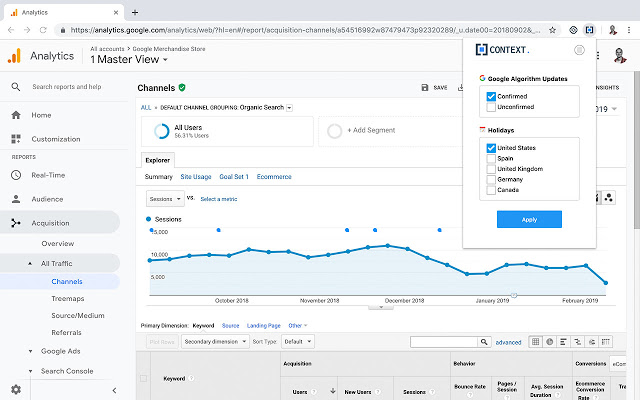
How can this be done?
Use an alert bar Alert bars are great for drawing attention to something crucial. Whether it’s regarding COVID-19, you’re promoting a special offer or you’re announcing an upcoming sale or event – alert bars draw attention quickly, no matter what page of your site is visited. Keep in mind that if you’re not utilising a CMS, you may require the help of a website development team. You will also need to ensure your message is short and snappy – alert bars are not designed to be lengthy, but engaging. The aim is to drive visitors to another page expanding on the topic. Use a different colour from your landing page to draw attention and ensure it can be easily customised and toggled on or off for regular updates.
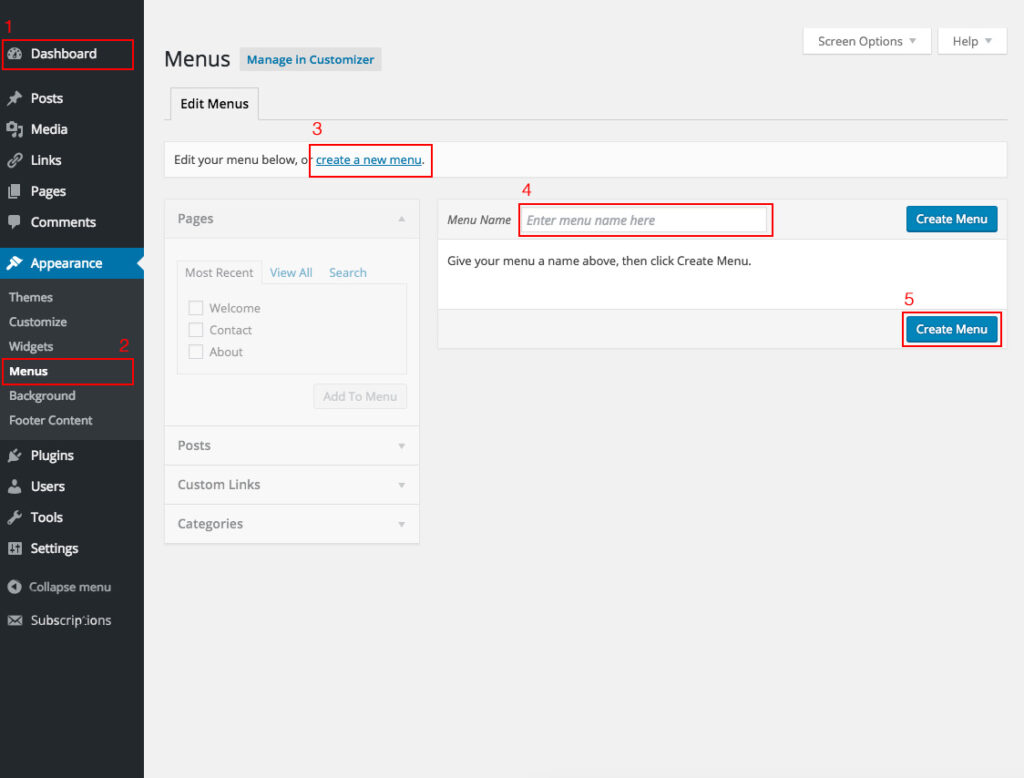
Navigation If your website uses a CMS (Content Management System), you will most likely be able to add this yourself. For example;- if you’re using WordPress, you can manage your navigation under ‘Appearance’ then go to ‘Menus.’ If you’re unsure, don’t hesitate to reach out to your Development Team for help.